Ambient intelligence for macOS
Bonnie
She listens, watches what you are working in, and operates real Mac applications on your behalf — with the same hands and eyes a person has. No app API, no scripting bridge, no vendor integration.
The way in
Any assistant has to get inside your applications.
The way in is the whole design.
There were three obvious roads. Each was rejected on the same argument — not because it is hard, but because of what it would cost the person whose machine it runs on.
App integrations and scripting bridges
Invisible authority, per-vendor coupling, and effects you cannot watch or interrupt mid-gesture. Every application has to bless you first, and what happens after that happens out of sight.
Model-generated code
Arbitrary execution inside the trust boundary. Whatever the model writes, your machine runs — and the blast radius is the whole account, not the one document you were editing.
Screenshot-and-click improvisation
No closed vocabulary, no provable effects, and unbounded improvisation against pixels that may mean anything. It is guessing at a picture, and it cannot tell you afterward what it actually did.
Remote Hands
Synthetic keyboard and pointer input, delivered to one exact pinned process, with read-only Accessibility as the only way of knowing anything happened. The same hands and eyes you have — which is precisely why it inherits the three properties the other roads give up.
Visible
macOS has one interactive foreground, and Remote Hands deliberately borrows it rather than pretending a separate mouse and keyboard exist. You watch the work happen. Nothing runs behind the screen you are looking at.
Interruptible
Your physical input keeps reaching macOS the whole time. When something newer takes the stage, the holder is paused resumably — the typist saves its remainder — never killed silently. Set physical input to win and your next keystroke stops her at the following guarded boundary.
Restoring
Every transaction snapshots the frontmost app, the focused window and element, and the cursor, then puts them back when restoring is still safe. The receipt grades what was actually observed rather than asserting success.
One frozen turn
A model choice is
a proposal, not permission.
Every turn runs against one immutable snapshot of the validated package graph. The model sees what that snapshot exposes, and answers with a proposal — which is then checked back against the very same frozen schema, stage, target and grants before anything is allowed to happen.
Edits you make while a turn is running apply to the next one. An edit that does not validate never lands at all: the last known-good runtime stays in place rather than a broken one taking the stage.
Freeze
Capture one validated package graph and the machine state needed for this turn.
An edit can affect the next turn, never this one.
Route
Match intent, app, target, permissions and fresh evidence against closed predicates.
A package contributes terms, not routing code.
Propose
Show the selected Skills to the inference provider and receive a proposed invocation.
A model choice is a proposal, not permission.
Revalidate
Check the proposal against the same frozen schema, stage, target and grants.
Nothing touches the Mac before this passes.
Execute
Run a native adapter, or Bonnie's own interpreter for a declared recipe.
Local policy and budgets remain authoritative.
Receipt
Record bounded provenance, delivery, effect and restoration evidence.
Raw user content is not a receipt.
Project
Persist only fields allowed by an explicit projection and local policy.
No projection means no durable memory.
Capability is data
What she can do is
declared, not programmed.
A .bonnie package is a portable, data-only declaration: canonical JSON, sorted keys, a SHA-256 digest over every decoded byte, and an optional Ed25519 signature. Unknown fields are a decode failure rather than something quietly dropped.
The grammar has no field for source code, executable paths, interpreter selection, shell commands or network transports — so third-party authorship changes what Bonnie knows about an application, never what your machine is willing to run. Teaching her a new app means writing vocabulary. It ships as data: no release, no new enum case, no per-application branch anywhere.
{
  "adapterID": "chrome.managed-ui",
  "operation": "chrome_new_tab",
  "title": "New Chrome Tab",
  "summary": "Press Command-T while Chrome
              owns the stage.",
  "steps": [
    { "id": "new-tab",
      "kind": "keyChord",
      "key": "t",
      "modifiers": ["command"] }
  ],
  "postconditions": [
    "applicationFrontmost",
    "applicationWindowAvailable"
  ],
  "timeoutSeconds": 10
}The postconditions are checked by Bonnie, never claimed by the package. A package cannot author its own success — action and attestation are separate authorities.
The declaration boundaryThe pixel doctrine
She does not
watch your screen.
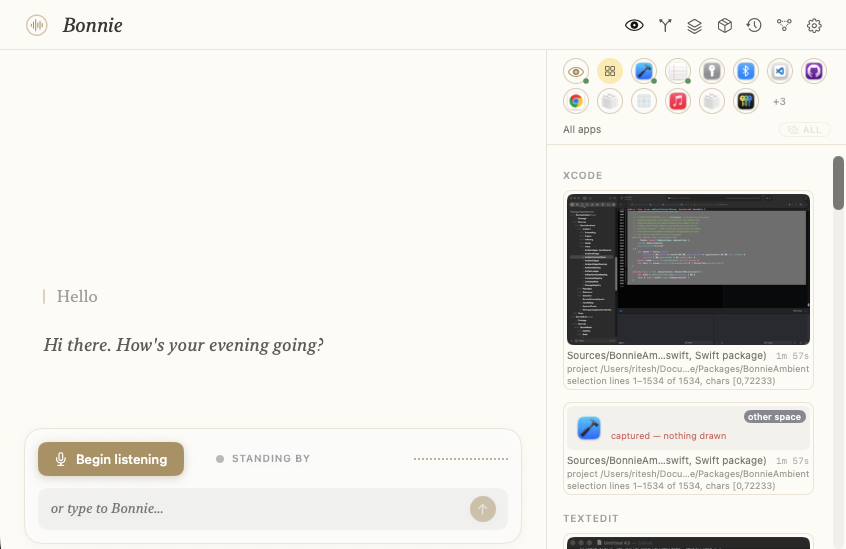
Everything Bonnie perceives in the background — which window you are in, what you have selected, what document is open, which controls a page offers — comes from read-only Accessibility and AppleScript. That path never reads pixels. There is no rolling capture of your desktop, because there is no code path that would produce one.
Screen Recording has exactly three sanctioned uses, and none of them is a background recorder:
The debugger's minimap, while you have the debugger open and are looking at it.
A screenshot, because you asked for a screenshot.
One ephemeral look, because you asked her to look. The region is compressed in memory, described, and the description is the only thing that survives the call.
When she does look, she says which region she actually got — the element under the cursor, the page area, or honestly the whole window — so a wide fallback is never dressed up as precision. And what she remembers afterward is words, not the image, which is why a follow-up question stays grounded without looking again.
Nothing is remembered because it happened. It is remembered because a package declared a projection for it, and local policy admitted that declaration.
Projection before persistenceA projection names its purpose, an explicit include list, a recursive exclude that wins over the include, and redaction that is on unless something turns it off. Memory is a thing that had to be asked for, in writing, in advance — which is the opposite of a recording you have to go and delete.
What she can do
Ten
packages.
An Ability is what Bonnie can do. A Skill is one action within it. The split between the two is deliberate: you can be good at design and an expert in one design tool, and those are different kinds of knowing. Disciplines are portable craft that outlive any single application; expertise teaches one program's actual gestures.
Writing
16 skillsCompose and revise prose, type at the caret, hold dictation, and find and edit passages by their text — across Xcode, Pages and Scrivener from one registration.
Design
25 skillsProvider-neutral design semantics: documents, pages, frames, shapes, text, restyling, effects, geometry, alignment, components — and one bounded whole-composition plan.
Coding
24 skillsXcode pair-coding against disk truth: read the current file, selection or symbol, bounded edits, build checks, tests, diffs and commits, per-project quirks.
Browsing
11 skillsProvider-neutral browser steering — locations, tabs, windows, history, find-in-page, scrolling — plus one bounded multi-step browsing plan.
Architect
6 skillsFrame a problem, explore a project, compare options, propose and review a design, capture a decision. No effectful bindings at all: it only thinks.
Window Management
7 skillsForeground apps and named windows, enumerate windows and mint stable handles, restore, minimise, enter and leave full screen.
Scrivener
8 skillsThe manuscript read, searched and restructured — splits, binder moves, status and progress — with the prose itself left to the writing hands.
Sketch
5 opsTeaches Bonnie to drive a running Sketch by lowering the design vocabulary into that application's own gestures.
Chrome
7 opsTeaches Bonnie to drive a running Chrome, through browsing-plan lowering and direct chords.
ShaderFeel
1 skillAnswers how she is feeling by writing a GLSL shader on the spot and compiling it in a new tab. Never reuses a stored one.
The client
Ink on paper,
running on your Mac.
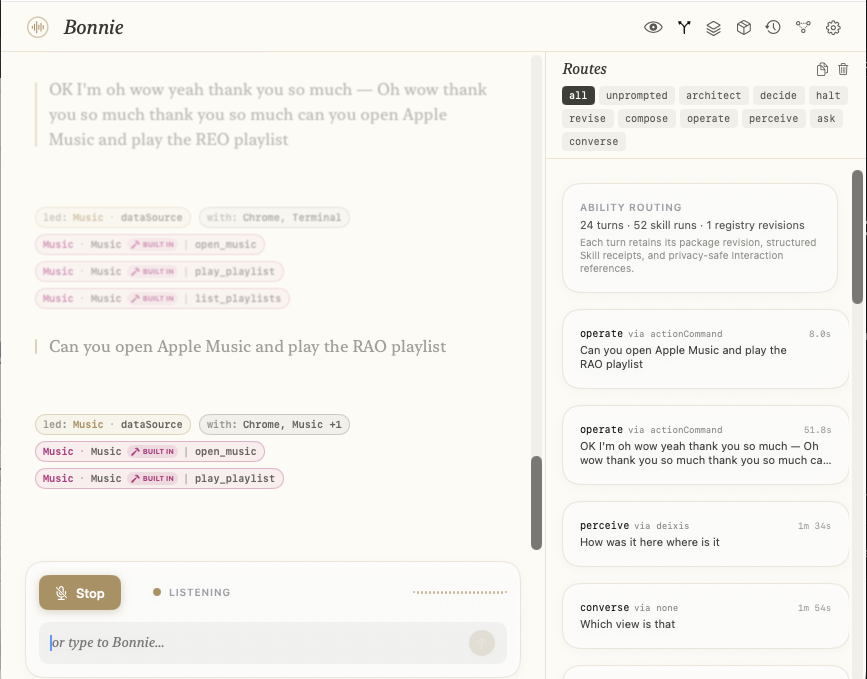
Ability Routing
Every turn logged as it actually ran: which skill led, which apps it worked with, and the exact skill runs beneath it — package, adapter, built-in or not — filterable by kind, from converse to operate.
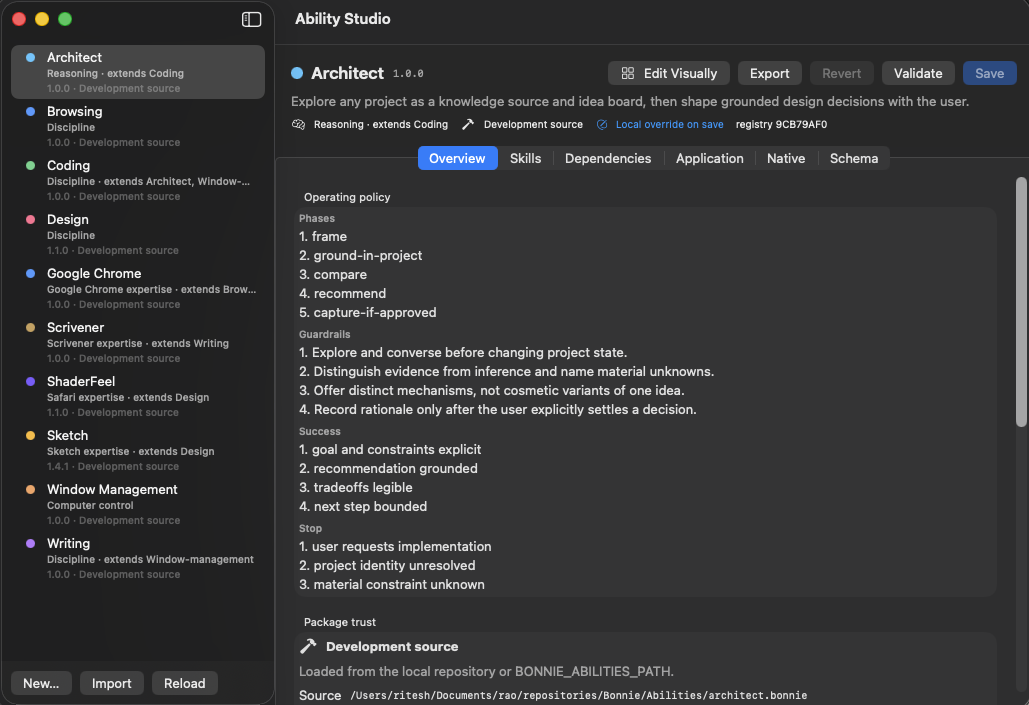
Ability Studio
The ten bundled packages in the sidebar, opened to Architect: its operating policy — phases, guardrails, and the stop conditions that end a turn — plus the package's trust level and its on-disk source.
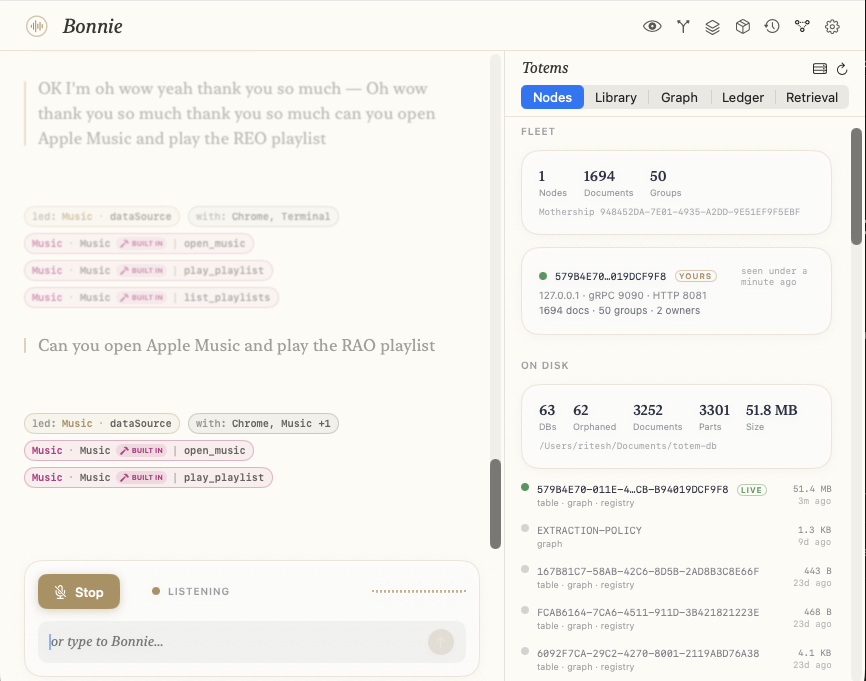
Her Totems
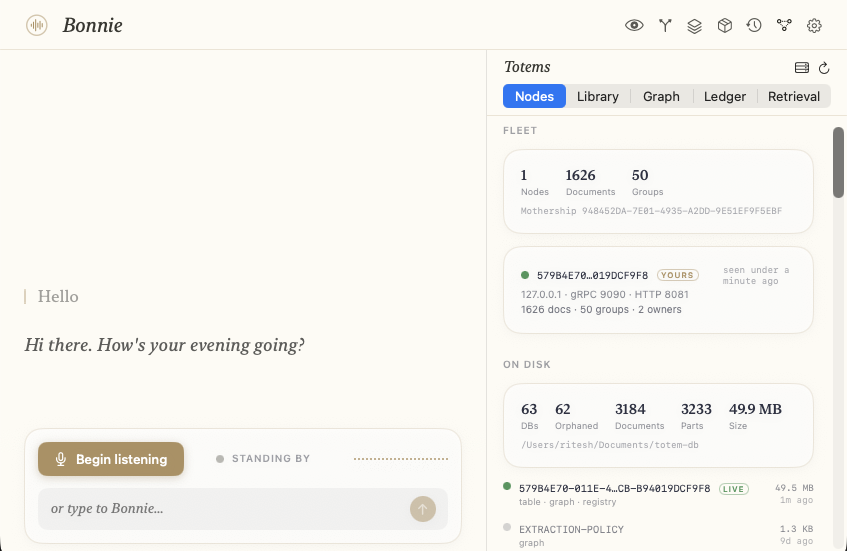
A small knowledge graph built from the user's own files: fleet totals, what is actually sitting on disk, and a live per-database registry with size and last-seen time — stored under a UUID the user owns.